Turning DFIR into leads - Part 1
Incident response investigations often start with a large amount of raw data spread across multiple sources. Forensic images will contain lots of valuable information, but identifying the relevant indicators can easily become overwhelming and time-consuming.
We took a set of playbooks provided by our partner NRD Cyber Security and used them as a starting point to improve our forensics workflows.
Our ultimate goal is to turn qcow2 snapshots into investigation leads as easily as possible.
Static forensic triage using Velociraptor and Dissect
The Static forensic triage of Linux images using Velociraptor and Dissect playbook tackles the first question of any forensic investigation: What changed on the system?
The diagram below shows the flow of the playbook. Evidence is analysed either as a tar.gz archive or as a qcow2 image, both being converted into an extracted filesystem. After running the triaging scripts, the output is (1) a set of ranked findings (medium, high, critical, review) from Velociraptor Artifacts, (2) system information gathered with Dissect and (3) a list of changed files. All can be used as initial leads for further investigation.
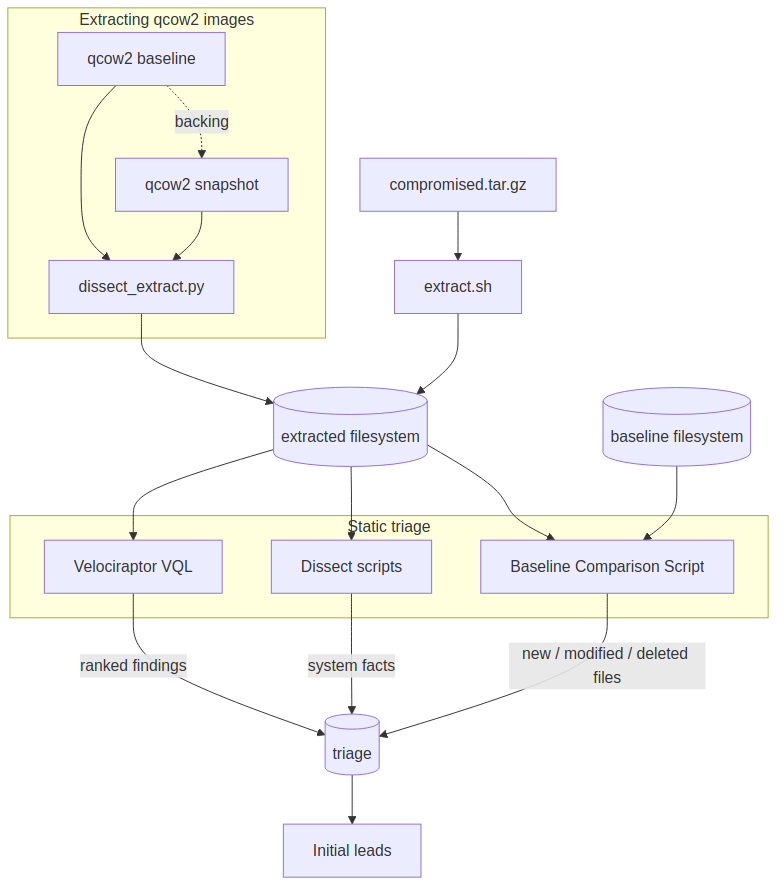
The analysis pipeline is built on three layers:
- Rule-based detection using Velociraptor VQL - A custom artifact defined as
Custom.IR.Linux.ImageForensicsevaluates critical paths (/etc/passwd, sudoers files, cron configs, systemd services, shell history) and flags known compromise patterns such as passwordless sudo, reverse shells and so on. The output is a set of findings ranked by severity that can be easily reviewed by an analyst to pinpoint IoCs and IoAs. - System information extraction using Dissect - Dissect is used to parse the filesystem and to dump system information (accounts, services, packages, network configs). It provides a structured view of the system which can be used to understand the context of the findings.
- Baseline comparison - This custom script computes SHA256 checksums of the files from the forensic image and compares them against a baseline image. The output is a list of new, modified and deleted files, which can be used to identify potential malware, persistence mechanisms or cleaned logs.
Adapting the data ingestion step
The original playbooks expected a tar.gz directory tree as an input, but in our infrastructure, we collect evidence as qcow2 snapshots based on a baseline image.
Instead of mounting the images with qemu-img and libguestfs which requires root privileges and exposing the kernel to an untrusted filesystem, we leveraged Dissect's ability to parse qcow2 chained snapshots. This allowed us to extract the filesystem into a directory layout exactly as the playbook expects.
Our adapted script, dissect_extract.py, is available in our fork of the playbooks. Running it on a qcow2 snapshot gives the following output:
$ python3 dissect_extract.py ~/snapshots/snapshot-ubuntu_2204-c4479da9e404417d973acee804a4487e.qcow2 ~/snapshots/baseline.qcow2

Snapshot   : /home/rocky/snapshots/snapshot-ubuntu_2204-c4479da9e404417d973acee804a4487e.qcow2
Baseline   : /home/rocky/snapshots/baseline.qcow2
Extract    : /home/rocky/images/snapshot-ubuntu_2204-c4479da9e404417d973acee804a4487e/extracted
Triage     : /home/rocky/images/snapshot-ubuntu_2204-c4479da9e404417d973acee804a4487e/triage

Opening the chain read-only...
Extracting  : OS root filesystem (with mounts)
Source paths: /

Extracted from  : OS root filesystem (with mounts)
Source paths    : /
Destination     : /home/rocky/images/snapshot-ubuntu_2204-c4479da9e404417d973acee804a4487e/extracted

Directories     : 8328
Files           : 58539
Symlinks        : 6358
Hardlinks       : 123
Special entries : 8 (device/fifo/socket)
Skipped         : 0
Errors          : 0
Bytes written   : 2430499861 (2317.9 MiB)
Elapsed         : 238.3s

Manifest        : /home/rocky/images/snapshot-ubuntu_2204-c4479da9e404417d973acee804a4487e/triage/dissect-extract-manifest.jsonl
Errors log      : /home/rocky/images/snapshot-ubuntu_2204-c4479da9e404417d973acee804a4487e/triage/dissect-extract-errors.log

Done. Filesystem extracted to: /home/rocky/images/snapshot-ubuntu_2204-c4479da9e404417d973acee804a4487e/extracted
From this point, the original playbooks can be executed as they are. Running the Velociraptor Artifacts collection on the extracted filesystem generates a report on known compromise patterns:
$ ./velociraptor artifacts collect Custom.IR.Linux.ImageForensics \
  --definitions ./artifacts/ \
  --args ImagePath="/home/rocky/images/snapshot-ubuntu_2204-c4479da9e404417d973acee804a4487e/extracted" \
  --format json \
  --output "/home/rocky/images/snapshot-ubuntu_2204-c4479da9e404417d973acee804a4487e/triage/velociraptor-imageforensics.json"
{
"Container": "/home/rocky/images/snapshot-ubuntu_2204-c4479da9e404417d973acee804a4487e/triage/velociraptor-imageforensics.json",
"Error": null
}
In parallel, executing the Dissect script to parse system configurations provides a system summary on users, services, ssh, network, syslog:
$ python3 "/home/rocky/soccare-quick-image-analysis-flow-main/dissect_image.py" \
  "/home/rocky/images/snapshot-ubuntu_2204-c4479da9e404417d973acee804a4487e/extracted" \
  --output "/home/rocky/images/snapshot-ubuntu_2204-c4479da9e404417d973acee804a4487e/triage"

======================================================================
dissect_image.py  —  Linux Image Forensic Triage
======================================================================
  Image  : /home/rocky/images/snapshot-ubuntu_2204-c4479da9e404417d973acee804a4487e/extracted
  Output : /home/rocky/images/snapshot-ubuntu_2204-c4479da9e404417d973acee804a4487e/triage
  Plugins: users, services, ssh, network, syslog

Loading target...
Target:
  hostname      : workstation-804cf5858f88
  os            : linux
  version       : Ubuntu 22.04.5 LTS (Jammy Jellyfish)
  architecture  : x86_64-linux

Running 6 plugin(s):
  [users] → 35 records  [dissect-users.json]
  [services] → 666 records  [dissect-services.json]
  [ssh] → 9 records  [dissect-ssh.json]
  [network] → 7 records  [dissect-network.json]
  [syslog] → 3962 records  [dissect-syslog.json]

Done. Results in: /home/rocky/images/snapshot-ubuntu_2204-c4479da9e404417d973acee804a4487e/triage
Extracting leads
With the pipeline completed, we can now query the findings to understand the attack vector. The Velociraptor report expands into one JSON file per artifact source, so a recursive grep for high severity findings is a good starting point:
$ grep -ri "high" /home/rocky/images/snapshot-ubuntu_2204-c4479da9e404417d973acee804a4487e/triage/velociraptor-imageforensics/
AuthLog.json reveals an SSH bruteforce attack targeting the root account:
{"FullPath":".../var/log/auth.log","Line":"Apr 7 10:14:19 workstation-804cf5858f88 sshd[985]: Failed password for root from 192.168.111.1 port 46458 ssh2","Risk":"HIGH"}
{"FullPath":".../var/log/auth.log","Line":"Apr 7 10:24:38 workstation-804cf5858f88 sshd[1379]: Failed password for root from 192.168.111.228 port 40982 ssh2","Risk":"HIGH"}
The bruteforce was possible due to a vulnerable configuration flagged in SSHDConfig.json, which explicitly allows direct root access:
{"Line":"PermitRootLogin yes","Risk":"HIGH"}
Following a successful authentication, the attacker established persistence. Velociraptor scanned /root/.ssh/authorized_keys and flagged a newly dropped RSA key with a highly suspicious comment (mdrfckr) assigned to it:
{
  "FullPath": ".../root/.ssh/authorized_keys",
  "Mtime": "2026-04-07T10:39:20Z",
  "KeyContent": "ssh-rsa AAAAB3NzaC1yc2E... mdrfckr\n",
  "Risk": "HIGH",
  "Note": "Root authorized_keys — grants direct root SSH access"
}
That comment is not a random string. mdrfckr is the signature of the Outlaw/Dota cryptomining botnet, which appends its own key to authorized_keys right after a successful SSH brute force to keep root access even if the password is changed. We ran into the same indicator before, in Attackers are stealing your CPU, where it showed up over 150 times across our honeypot infrastructure.
Put together, the three findings reconstruct the intrusion in a couple of minutes of reading: root login was allowed over SSH, the account was brute-forced and an Outlaw key was appended in /root/.ssh/authorized_keys.
Takeaways
Setting up tools like Velociraptor and Dissect can significantly speed up the investigation process by providing an initial overview of the system state. Moreover, Velociraptor Artifacts allows for a GitOps approach to create a collection of incident analysis procedures. Responders can easily define custom artifacts that can be used for subsequent incidents.
Integrating external DFIR playbooks requires a decoupled data ingestion layer. For us, parsing qcow2 snapshots entirely in user-space using Dissect removes hypervisor dependencies and eliminates the security risks of mounting the images.
This covers only half of what NRD Cyber Security shared with us. In Part 2 we look at the other half - the Velociraptor artifacts built to run against live instances through an agent.
SOCcare
The SOCcare project is co-funded by the European Union, alongside our collaborators, NRD Cyber Security and RevelSI, and supported by the European Cybersecurity Competence Centre (ECCC) Centre (ECCC) under Grant Agreement No. 101145843. Views and opinions expressed are however those of the author(s) only and do not necessarily reflect those of the European Union or the European Cybersecurity Competence Centre. Neither the European Union nor the European Cybersecurity Competence Centre can be held responsible for them.