Turning DFIR into leads - Part 2
Running investigation scripts over a forensic image tells you about the underlying system and services that ran on it, but getting there costs us time to take the snapshot, perform an extraction and run a full triage run. After an incident, sooner or later the question changes to: is this happening anywhere else, right now?
In Part 1 we adapted the Dissect and VQL playbooks from NRD Cyber Security so they could triage our qcow2 snapshots. The same repository ships a second category of Velociraptor Artifacts built for the opposite situation - instead of parsing an extracted filesystem, they run on live instances through a Velociraptor agent, across every host that is onboarded.
So we deployed agents on two freshly provisioned instances and ran the Linux threat hunting Artifacts against both as a proof-of-concept fleet-wide hunt.
Picking up Velociraptor Artifacts
The repository ships Artifacts across three categories:
Custom.IR.*- incident response, client-side collectionCustom.TH.*- threat hunting, client-side detectionCustom.PB.*- playbooks, server-side analysis of the collected hunt data
Most playbooks in the repository are Windows-oriented, but there are a few written for Linux, mostly under the Custom.TH.Linux.* category.
The table below summarizes the targeted configs or logs:
| Artifact | Targets |
|---|---|
TH.Linux.InitialAccess | SSH brute force, suspicious logins, new local accounts, weakened sshd_config, webserver-spawned shells |
TH.Linux.Execution | Reverse shells, /tmp execution, memfd (fileless), unusual parent-child |
TH.Linux.Persistence.Hunt | Cron, systemd, init scripts, shell profiles, authorized_keys, LD_PRELOAD, PAM |
TH.Linux.Persistence.Extended | udev rules, XDG autostart, MOTD scripts, logrotate hooks, web shell persistence |
TH.Linux.PrivEsc.Hunt | SUID/SGID, sudo rules, capabilities, privileged groups, writable system files and PATH dirs |
TH.Linux.PrivEsc.Extended | Kernel exploit artifacts, polkit, ptrace injection, user namespaces, NFS no_root_squash, container breakout |
TH.Linux.LateralMovement | known_hosts, SSH agent hijack, network scanning, tool transfer, SSH tunnelling, remote command execution |
Starting a Velociraptor hunt
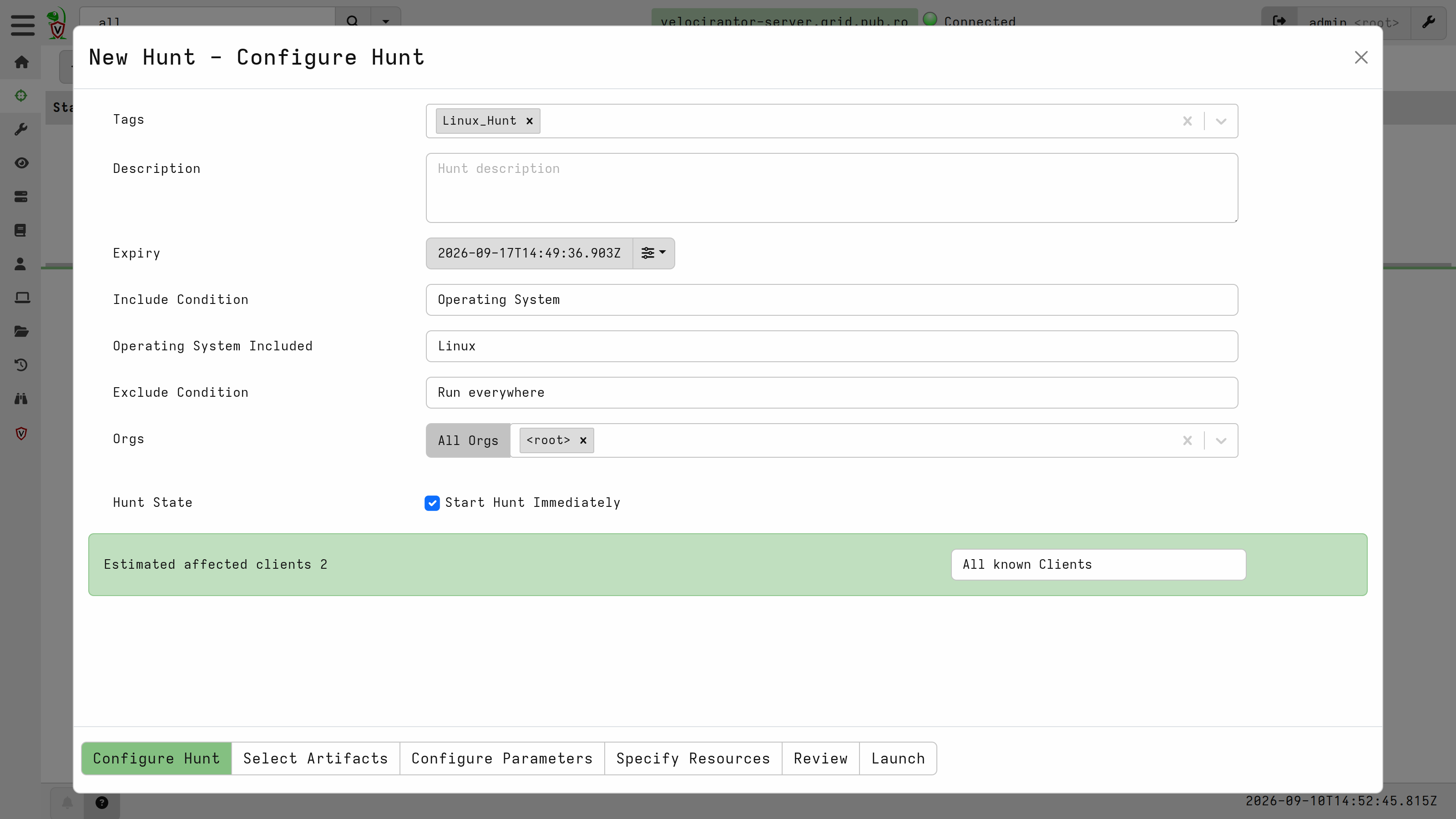
A Velociraptor hunt runs a set of Artifacts against every client matching a condition, which lets us collect from a whole Linux or Windows fleet at once. We created a new hunt with the included condition set to Operating System - Linux so that only Linux agents are scheduled:
Under Select Artifacts, we picked the Linux threat hunting Artifacts:
Custom.TH.Linux.InitialAccess       - how did the adversary get in?
Custom.TH.Linux.Execution           - what processes ran?
Custom.TH.Linux.Persistence.Hunt    - is persistence achieved?
Custom.TH.Linux.PrivEsc.Hunt        - did the adversary escalate?
Custom.TH.Linux.LateralMovement     - did the adversary spread?
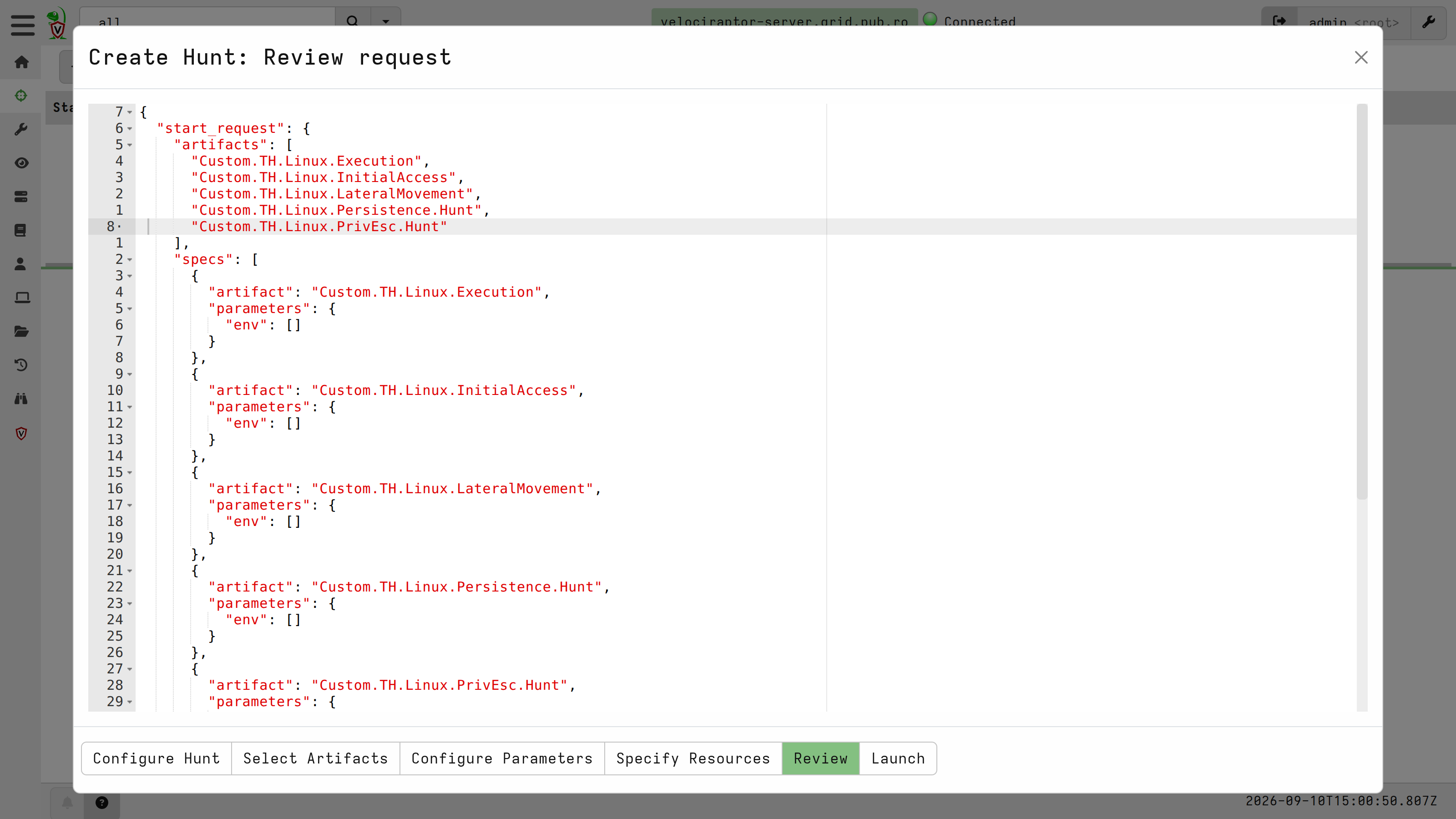
The Review tab renders the requests exactly as they will be sent to the clients. After checking the list of Artifacts and clients that are going to be queried, we can launch the hunt.
After launching the hunt, we can track the progress across the fleet in the overview tab:
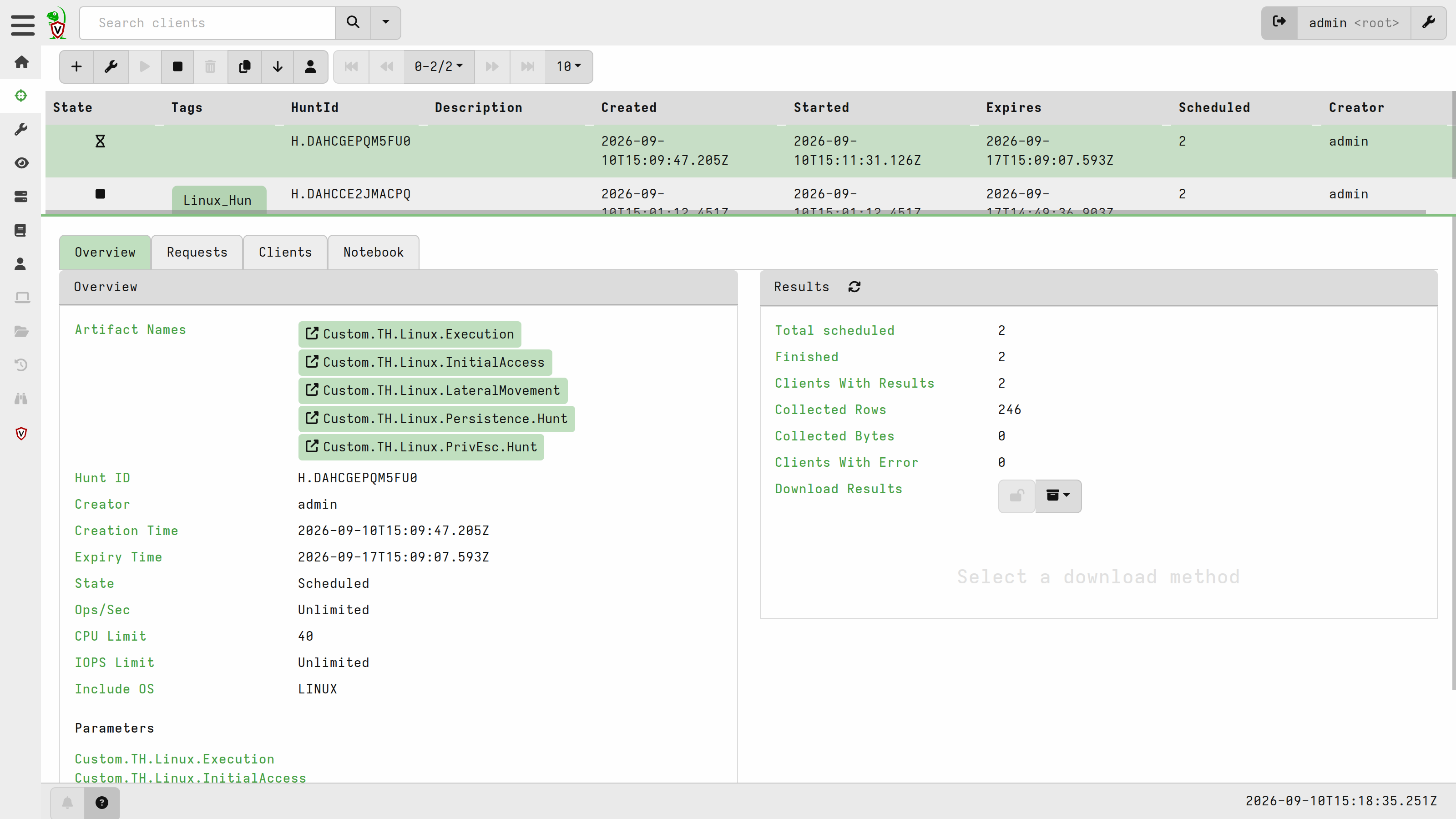
The first hunt on a clean fleet
Every hunt comes with a notebook, and Velociraptor populates it with one VQL cell per artifact source:
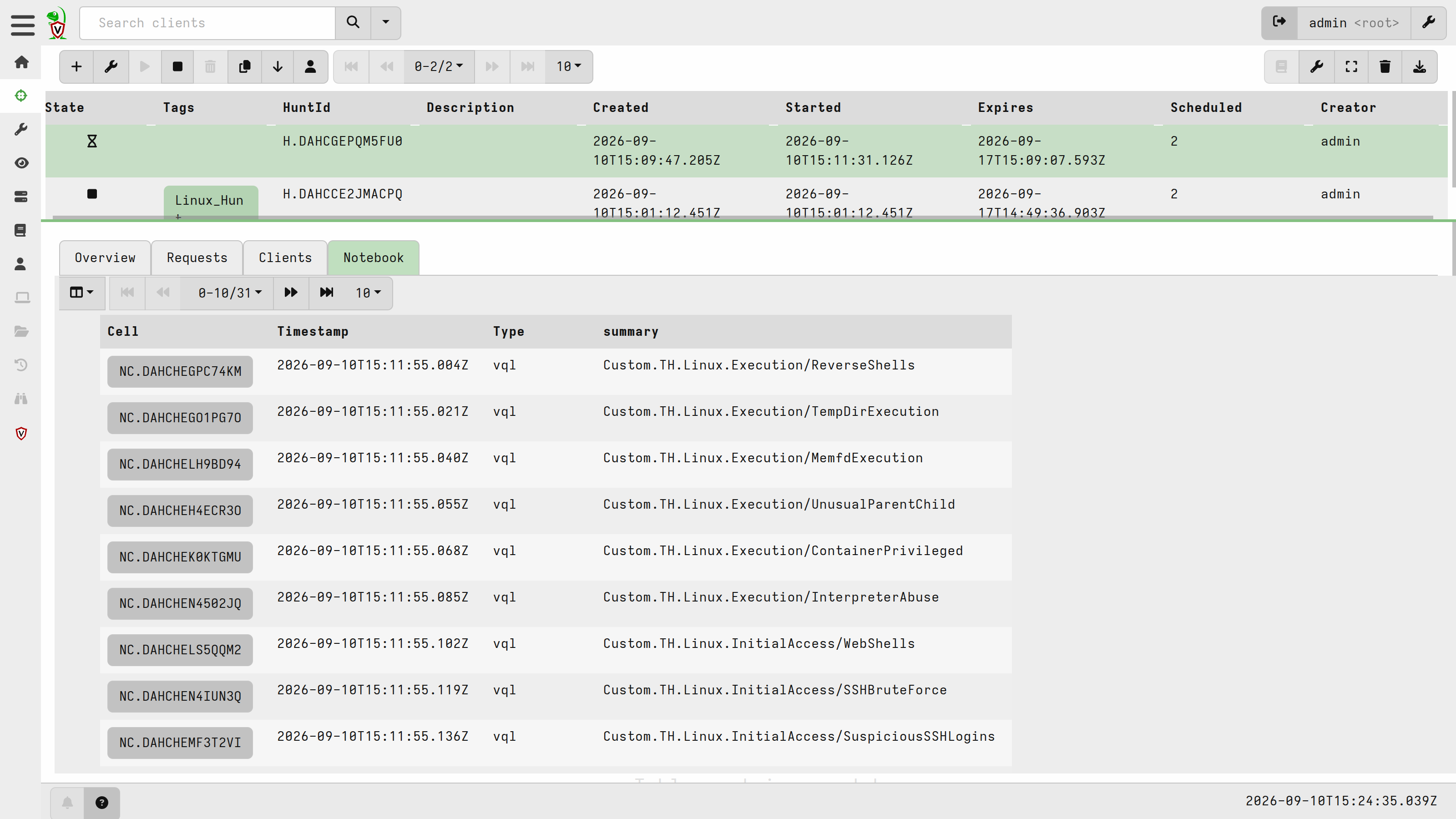
Browsing the notebook, we can review the CRITICAL and HIGH findings.
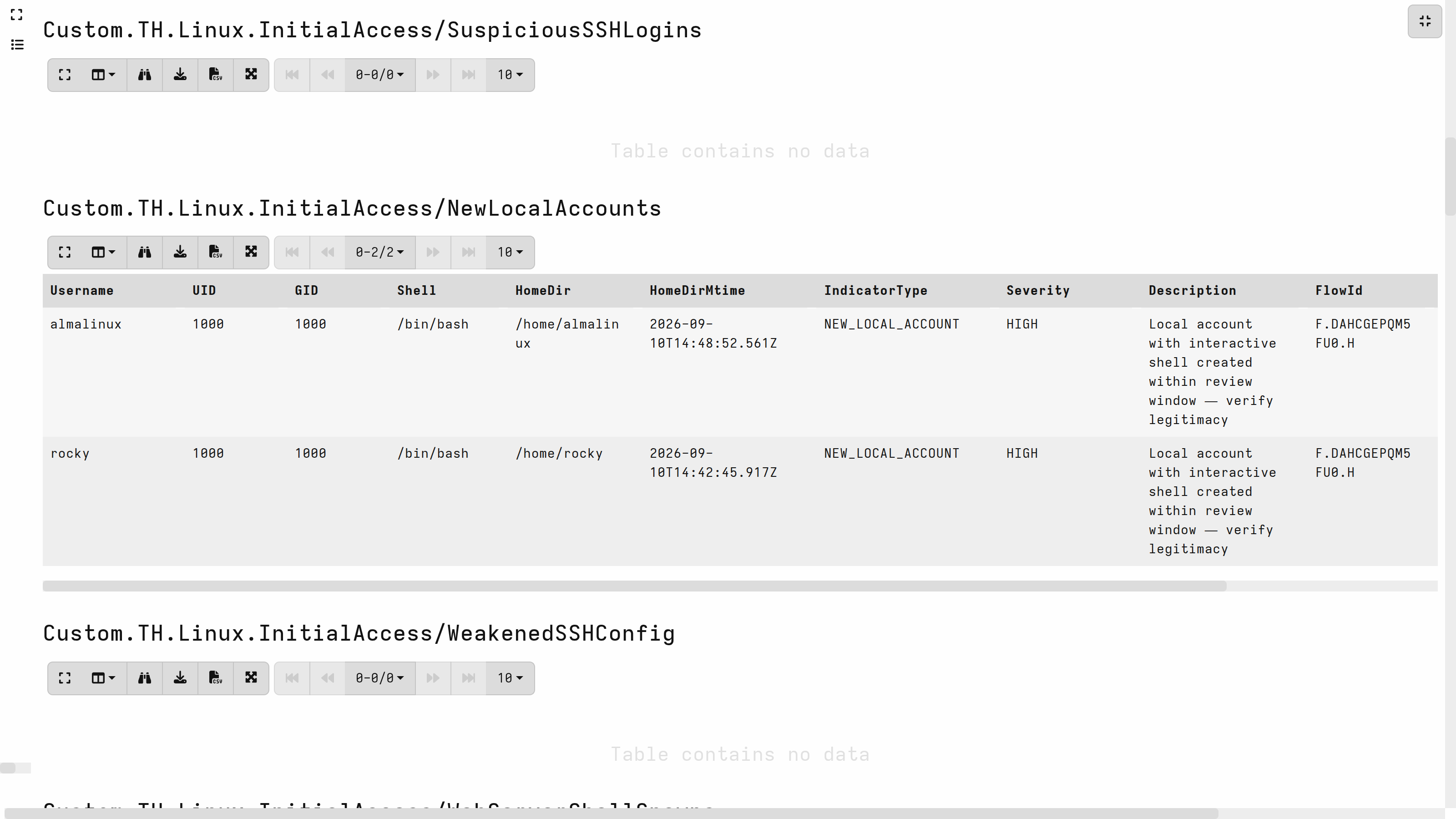
InitialAccess/NewLocalAccounts flagged two HIGH findings, one per host, the almalinux and rocky accounts, both with an interactive shell and a home directory created inside the review window. Both are the cloud-init default users, created when the instances were provisioned.
PrivEsc.Hunt/SudoRules returned eight rows, four of them CRITICAL:
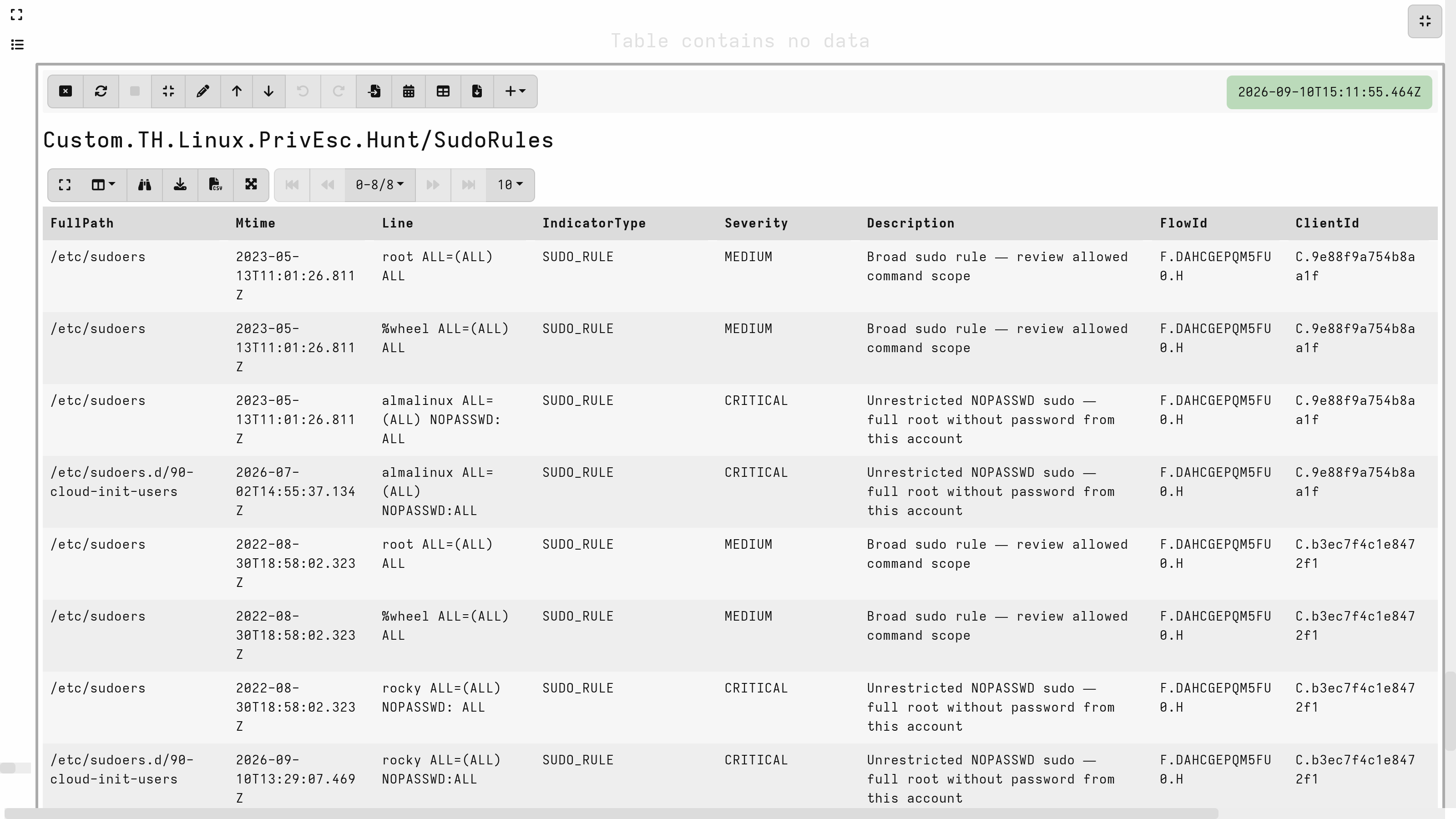
The root ALL=(ALL) ALL and %wheel ALL=(ALL) ALL MEDIUM entries are the distro default. The CRITICAL NOPASSWD rules come from /etc/sudoers.d/90-cloud-init-users, again written at provisioning time. The Mtime column is what separates a provisioning artifact from an intrusion here: these timestamps line up with each host's build, not with any later activity.
The hunt ran cleanly across the fleet, it returned findings at every severity up to CRITICAL, but none of them were an intrusion. These are useful things to know about your own environment, but it does not tell us whether these Artifacts would catch an actual adversary. To find out, we need hosts with something worth finding on them.
Detonating known techniques with Atomic Red Team
Atomic Red Team is an open-source library of small tests maintained by Red Canary, each mapped to a MITRE ATT&CK technique. A test does the smallest realistic version of what an adversary would do - append a key to authorized_keys, drop a setuid binary in /tmp, load a kernel module. That makes them a practical way to generate known indicators. So everything the next hunt returns can be checked against ground truth.
We ran the following tests through the invoke-atomicredteam PowerShell module, picked to match the Artifacts shipped in the playbook:
| # | Technique | What it leaves on the host | Expected to surface in |
|---|---|---|---|
| 1 | T1136.001 Create Account: Local Account | new account with root GID and an interactive shell | InitialAccess/NewLocalAccounts |
| 2 | T1543.002 Systemd Service | user unit under ~/.config/systemd/user | Persistence.Hunt (systemd) |
| 3 | T1053.003 Scheduled Task/Job: Cron | job written to /etc/cron.d | Persistence.Hunt (cron) |
| 4 | T1546.004 Unix Shell Configuration Modification | command appended to ~/.bashrc | Persistence.Hunt (shell profiles) |
| 5 | T1574.006 Dynamic Linker Hijacking | library path in /etc/ld.so.preload | Persistence.Hunt (LD_PRELOAD) |
| 6 | T1098.004 SSH Authorized Keys | key appended to authorized_keys | Persistence.Hunt (authorized_keys) |
| 7 | T1548.001 Setuid and Setgid | setuid binary dropped in /tmp | PrivEsc.Hunt (SUID/SGID) |
These seven cover three of the five Artifacts in the hunt: InitialAccess, Persistence.Hunt and PrivEsc.Hunt.
Hunting a compromised fleet
With the tests detonated, we launched the same hunt again.
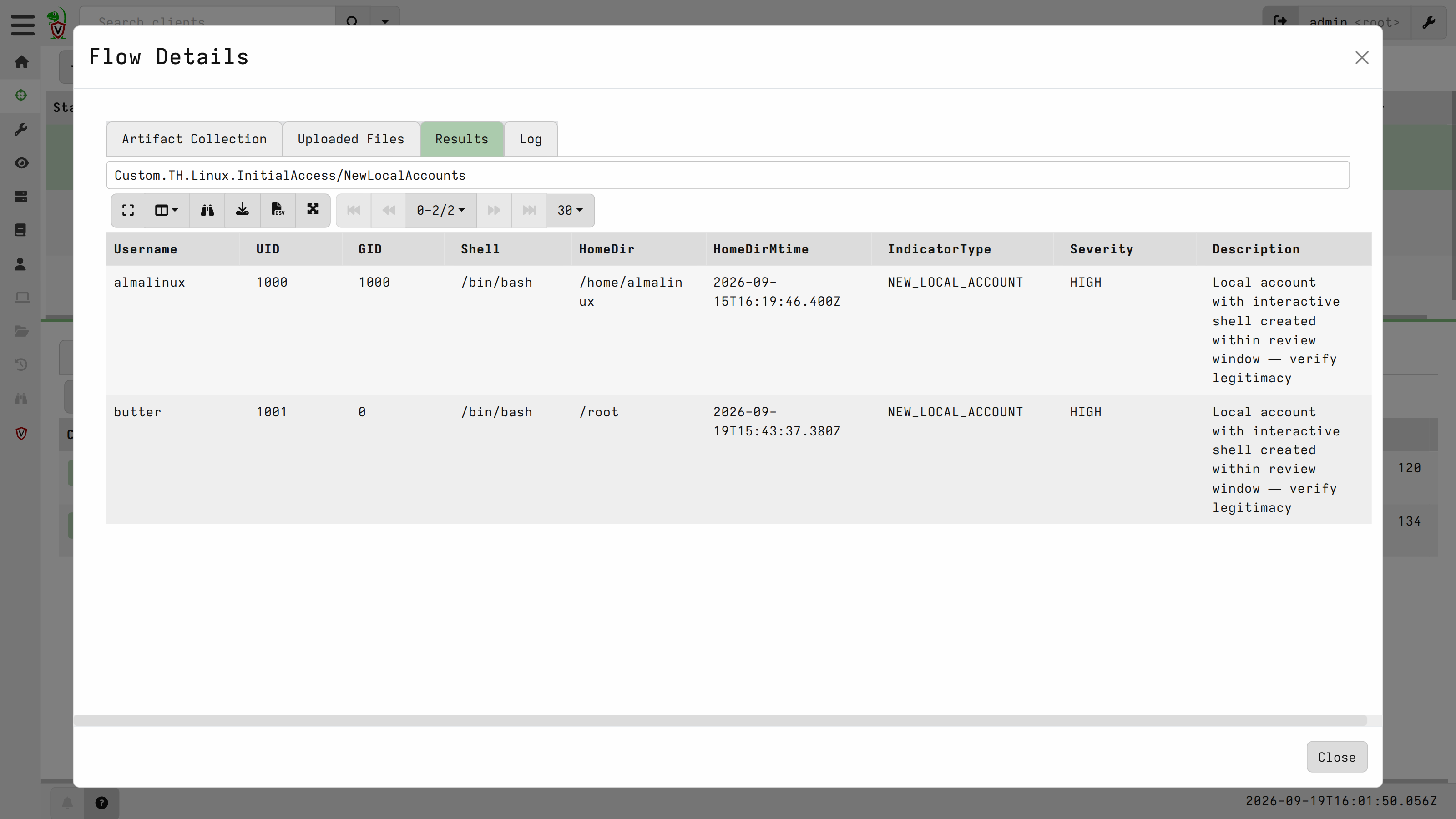
NewLocalAccounts now returns a newly created account that shouldn't be configured on the system. butter has GID 0 and /root as its home directory, both reasons for concern:
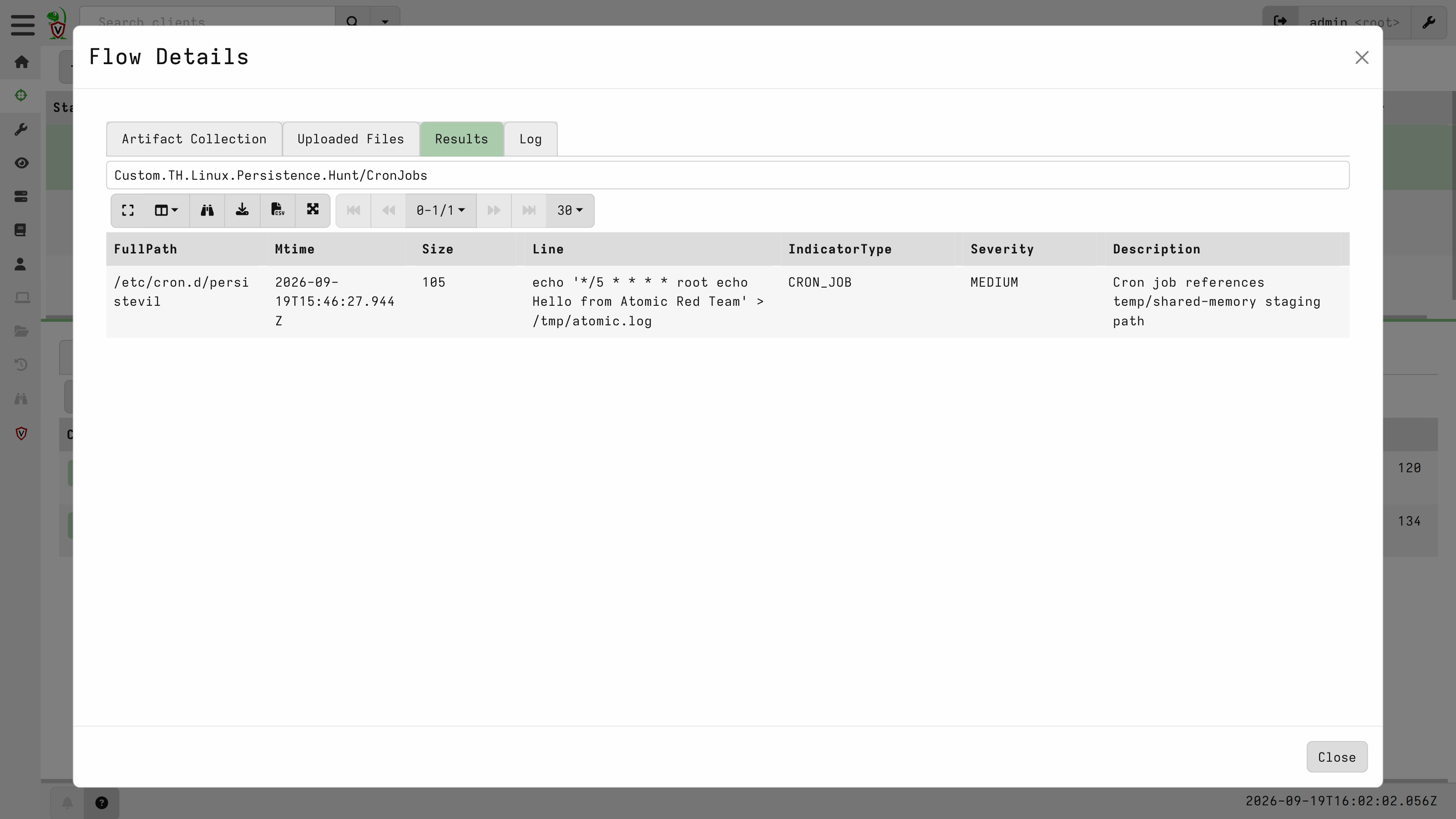
CronJobs returns /etc/cron.d/persistevil, running as root every five minutes - and ranks it MEDIUM. This is probably the most obviously hostile indicator on the machine:
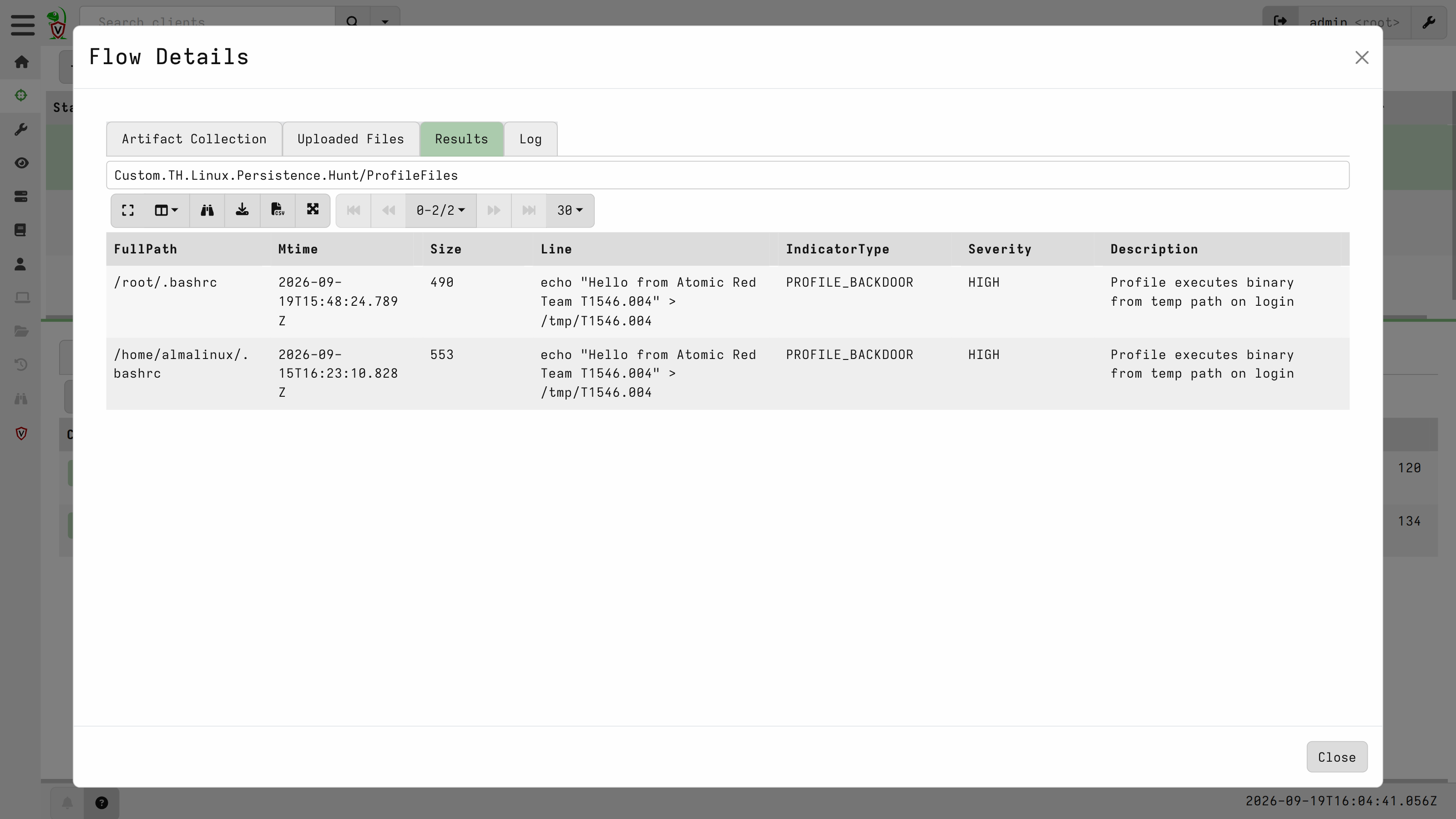
ProfileFiles picks up changes in /root/.bashrc and /home/almalinux/.bashrc, flagged HIGH as PROFILE_BACKDOOR because the appended line executes out of /tmp on every login.
LibraryPreload flags /etc/ld.so.preload pointing at a library in /tmp, and ranks it as CRITICAL with the reason spelled out: global library preload active - intercepts libc calls for every process on the system Every process started after that line was written loads an adversary library first:
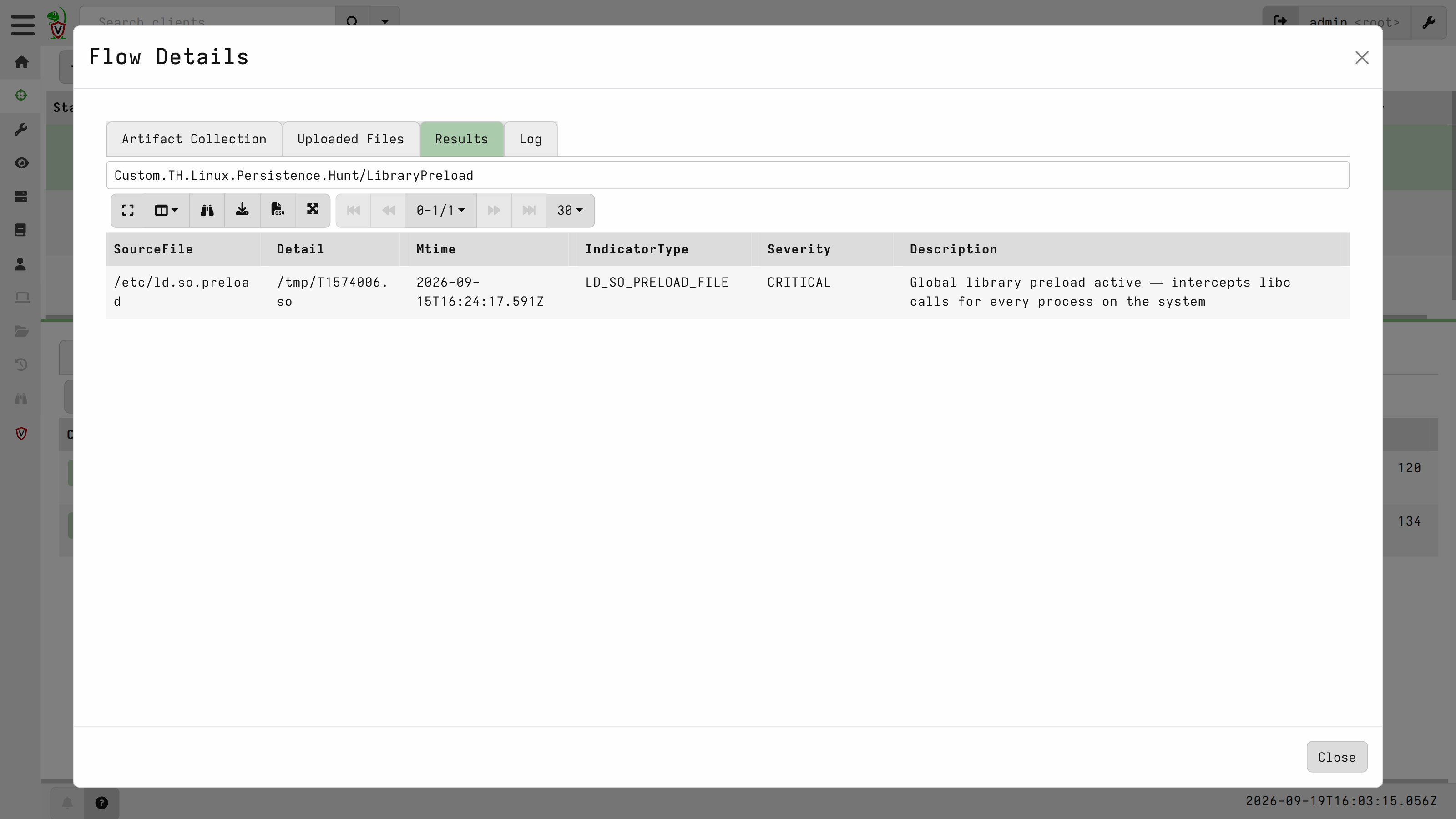
The indicators found describe the context of the incident on the host: an account that should not exist, a root cron job, and a global library preload. What makes them investigation leads rather than noise is not their severity, but the fact that none of them were in the first baseline hunt.
Takeaways
Hunt your fleet while it is still clean. The first run produced CRITICAL and HIGH findings and not a single intrusion, and that turned out to be the most reusable result in this post. Knowing that cloud-init accounts and 90-cloud-init-users are what your environment looks like at rest is what lets you recognise the one row that does not belong. Run the hunt on a new build, keep the output, and treat it as the baseline.
The two halves of the playbooks answer different questions. In Part 1 it was what changed on this one system?, which meant acquiring a snapshot and triaging it offline. Here it is is this happening anywhere in the fleet right now?, answered across every enrolled host without touching an image. A hunt tells you where to look; the static triage from Part 1 gives you the deep, point-in-time view of the host it pointed at.
SOCcare
The SOCcare project is co-funded by the European Union, alongside our collaborators, NRD Cyber Security and RevelSI, and supported by the European Cybersecurity Competence Centre (ECCC) Centre (ECCC) under Grant Agreement No. 101145843. Views and opinions expressed are however those of the author(s) only and do not necessarily reflect those of the European Union or the European Cybersecurity Competence Centre. Neither the European Union nor the European Cybersecurity Competence Centre can be held responsible for them.